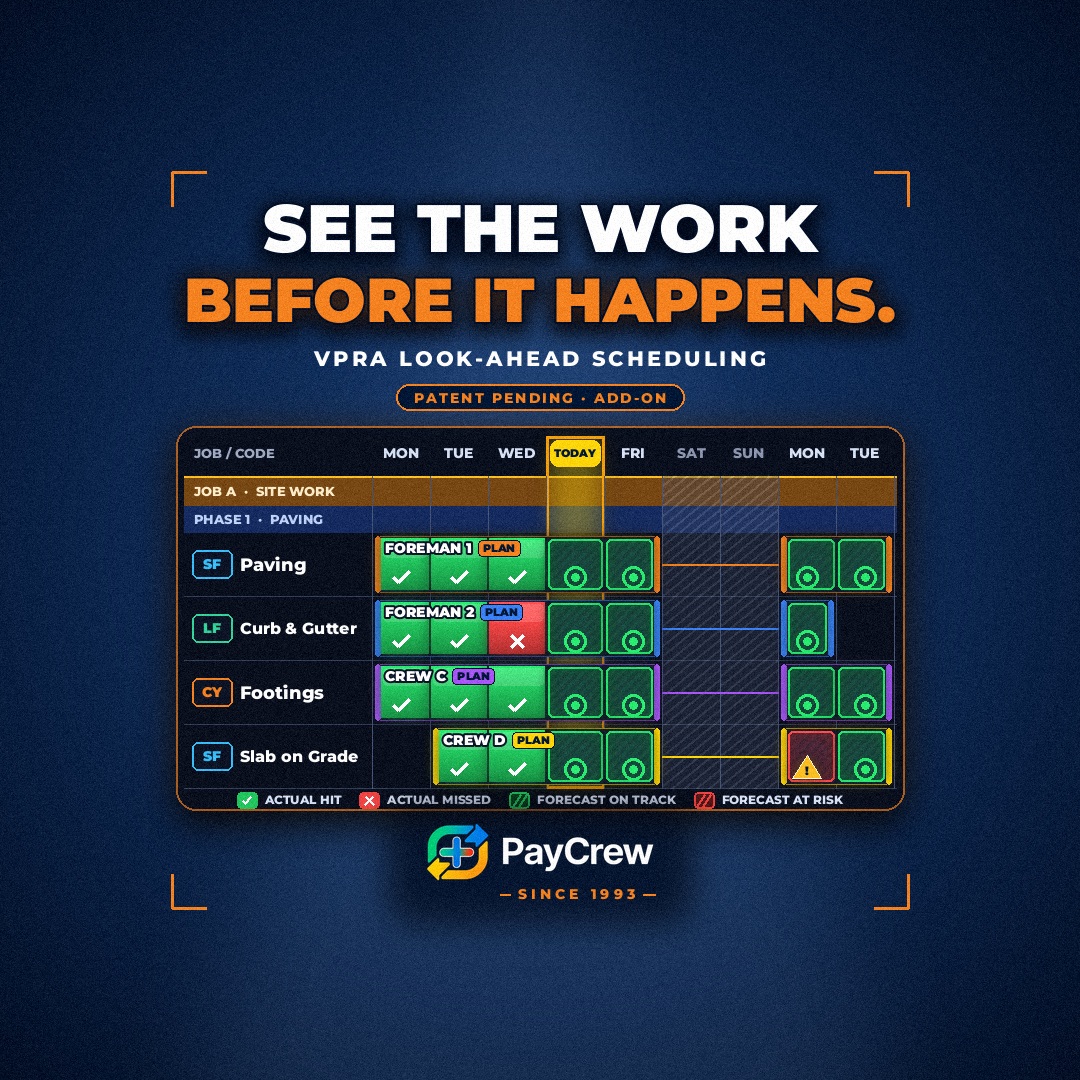
Most look-ahead schedules tell you who's going where. Ours tells you what they should get done when they get there.
What a typical look-ahead misses
A typical look-ahead is a list of crews and jobs. Monday, crew A on the east job. Tuesday, crew B on the parking deck.
That's useful. But it says nothing about whether the plan can actually hit the numbers.
Is a five-person crew enough for that pour? Will three days cover the section, or does it need four? Is the weather going to cost you Thursday? The schedule doesn't know. It just shows names in boxes.
When I ran crews, the schedule and the production numbers lived in different places. The scheduler moved crews around. The estimator had the rates. Nobody put them together until the job was running long.
Build the look-ahead around production
That's why we built our VPRA add-on, the Visual Production Rate Analyzer.
VPRA builds the look-ahead around production. You drag crews onto the job, phase and cost code. VPRA turns that plan into a daily goal the crew can understand.
For example, a 5-person crew working 8-hour days at your estimated or average production rate should place this many units today. The crew size, the hours and the rate become one number.
Close the loop every day
Then the field closes the loop.
Actual quantities come in from the Job Sheet. Every plan day turns green when the goal is met or red when it falls short. You don't wait for the end of the job to find out the plan was wrong. You see it the next morning.
See the risk before it happens
Weather flags mark the days at risk before the crew shows up. If rain is coming Thursday, you know which goal is in danger, and you can adjust the plan while there's still time.
That's the real value of a look-ahead. Not just knowing where people will be. Knowing which days are at risk, and doing something about it early.
From the plan to the field
When the plan is locked, it goes straight to the field in CraftBelt. The crew sees where they're going and what the goal is for the day.
No separate email. No phone call the night before. The schedule and the goal arrive together.
One screen, looking both ways
The result: your schedule, your production goals and your actual results all live on one visual screen. Looking ahead, and checking back every day.
- Plan crews by job, phase and cost code
- Turn crew size, hours and rate into a daily goal
- See actual results turn each day green or red
- Spot weather risk before the crew shows up
- Send the locked plan to the field
Why it matters for the crew
For the crew, a production look-ahead means the goal is set before they arrive, and it's based on a real crew size and real hours. They're not walking into a number someone guessed after the fact. They can see what the day should look like, and plan for it.
It also helps the people building the schedule. They can see right away when a plan asks too much of a crew, and move people before it becomes a problem on site.
The same simple idea
It's the same simple idea we've focused on for 33 years: units per man-hour. Now it drives the schedule too.
Read more about units per man-hour, see VPRA, and see how it ties to daily production by cost code.
PayCrew V3 is built the way you work and can be fully customized to fit your workflows.